SMART TV IPTV GUIDE
IPTV Smart TV
If you want IPTV on a Smart TV, the main question is not only which subscription to buy. It is also which TV system you use, which app is available in your store, and how the setup process works on your screen. Samsung, LG, Android TV, Google TV, and VIDAA-based TVs do not all behave the same way.
This page helps you choose the right path faster. It explains the main Smart TV platforms, shows the most useful IPTV app options, covers installation basics, and links you to the app or device-specific pages you may need next.
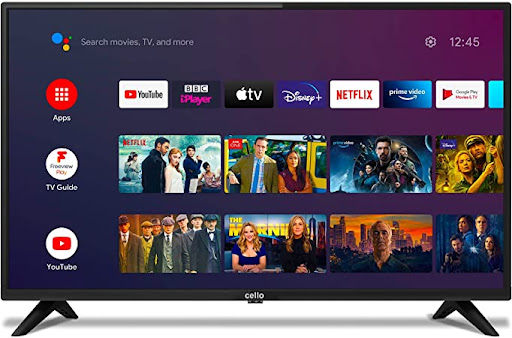
Choose the Right IPTV App for Your Smart TV
Most Smart TV users are looking for practical answers. They want to know which app works on their TV, where to download it, what to do if the app is missing from the TV store, and which device path is easiest if the built-in Smart TV system is too limited.
That makes this page especially important before purchase. Some users will stay with a native Smart TV app, while others will discover that a Firestick or Android TV device gives them more flexibility. The right IPTV Smart TV page should help with both decisions.
Supported Smart TV Platforms
Smart TV compatibility usually depends on the operating system inside the screen, the app store available on that TV, and whether the IPTV player app supports that platform.
Samsung Smart TV
Samsung TVs commonly rely on Smart Hub and the TV apps environment. They are one of the most important targets for Smart TV IPTV searches because many users want a direct in-TV app installation path.
LG Smart TV
LG models usually depend on webOS and the LG Content Store. This is why many users search specifically for IPTV on LG Smart TV rather than searching only for a generic app name.
Android TV / Google TV
Android TV and Google TV are usually the most flexible Smart TV systems because many compatible IPTV apps can be found through Google Play.
Hisense VIDAA
Some Hisense screens use VIDAA. Availability depends on the TV model, region, and whether the IPTV app you want supports that platform.
Roku TV & Other Smart Screens
Some ecosystems offer fewer native IPTV-style app options than Samsung, LG, or Android TV. When that happens, users often move to a separate streaming device instead.
When to Use a Separate Device
If your TV store does not offer the app you need, or if you want more player flexibility, devices such as Firestick or Android TV can be easier than relying only on the TV’s built-in operating system.
How to Install IPTV Apps on Smart TVs
The installation flow varies by platform, but the same pattern appears again and again: open the TV store, search for the app, install it, then enter your playlist or Xtream login details inside the app.
How to Install on Samsung Smart TV
1. Open the Home screen and go to Apps.
2. Use search to find the app you want.
3. Open the app page and select Install.
4. Open the app after installation.
5. Enter your playlist URL, Xtream account, or activation details depending on the app.
How to Install on LG Smart TV
1. Press Home and open the LG Content Store.
2. Search for the IPTV player app you want.
3. Select Install.
4. Open the app after installation.
5. Complete setup inside the player app.
How to Install on Android TV / Google TV
1. Make sure the TV is connected to the internet.
2. Open the Google Play Store.
3. Search for the IPTV app you want.
4. Select Install.
5. Add your playlist or Xtream details after opening the app.
What to Do Before Setup
Before installing any Smart TV app, check your TV operating system, confirm the app is available in your region, connect the TV to stable internet, and prepare your playlist or account details in advance.
Why App Availability Can Change
Not every IPTV player app is listed in every Smart TV store. App availability can vary by region, TV model, operating system, and the app publisher’s support choices.
Best IPTV Apps for Smart TV
These app blocks give visitors the next step after platform selection. Each one can later connect to a dedicated app guide, setup page, or troubleshooting article.
IPTV Smarters Pro

IBO Player
SmartOne IPTV
TiviMate
XCIPTV

IBO Pro Player
How to Compete With Strong IPTV Smart TV Pages
The strongest pages in this search area usually win because they combine several things at once: platform coverage, app coverage, installation steps, internal links to deeper guides, and language that matches what users actually search. A thin page with only one short paragraph rarely competes well against content that explains Samsung, LG, Android TV, apps, setup, and troubleshooting in one structure.
That is why this page is built around real user questions: Which app works on my TV? Where do I install it? What if the app is not in the store? Should I use a separate device instead? Those are the questions that make the page helpful enough to compete.
To strengthen page quality further, use internal links from this page to your pricing page, package page, IPTV Devices page, and every app guide mentioned here. You can also keep one neutral external reference such as this overview of IPTV.
Smart TV Search Intent
Users searching IPTV for Smart TV often want a practical guide, not only a sales pitch. They are usually comparing app availability, store support, and setup difficulty.
Why Keywords Need Variety
This page can naturally support phrases such as IPTV for Smart TV, best IPTV app for Smart TV, smart TV IPTV app, and how to install IPTV on Smart TV without stuffing one exact phrase repeatedly.
How Internal Links Help
A strong Smart TV page should push visitors toward the next useful page, whether that is pricing, packages, a channel list, or an app guide.
Frequently Asked Questions About IPTV Smart TV
What is the best IPTV app for Smart TV?
The best IPTV app for Smart TV depends on the TV platform. Samsung, LG, Android TV, and VIDAA may not offer the same player apps in their stores.
Can I install IPTV apps directly on Samsung and LG Smart TVs?
Yes, many users install compatible player apps directly from Samsung’s apps area or the LG Content Store, but availability depends on app support and region.
What if the IPTV app is not available in my TV store?
Check whether the app supports your TV system and your region. If not, consider an alternative player app or a separate device such as Firestick or Android TV.
Should this page link to app guides?
Yes. This page works best as a Smart TV hub that links to app-specific pages such as IPTV Smarters Pro, IBO Player, TiviMate, XCIPTV, and other future tutorials.
Ready to Set Up IPTV on Your Smart TV?
Continue to pricing, browse packages, or open the Smart TV app guide that matches the player you want to use.