COMPLETE SPARKLE TV APP GUIDE
Sparkle TV app is one of the most useful IPTV player options for viewers who want a TV-first experience on Android TV, Google TV, and Fire TV style devices. It is often compared with TiviMate, IPTV Smarters Pro, and XCIPTV because it balances a clean television layout with support for common provider formats.
The official Sparkle TV site describes it as a DVR/PVR player for Android TV, Google TV, and Fire TV stick, with support for formats such as m3u, xtream codes, and xmltv, and even over-the-air sources through tools like HdHomeRun, Plex, or Jellyfin. That makes it appealing to users who want one player that feels flexible without losing its television focus.
If you are trying to decide whether Sparkle TV app is the right IPTV player for your device, this page explains what it does, how setup usually works, which screens it suits best, what users like about it, and when it makes more sense than other IPTV apps.
What Sparkle TV App Does
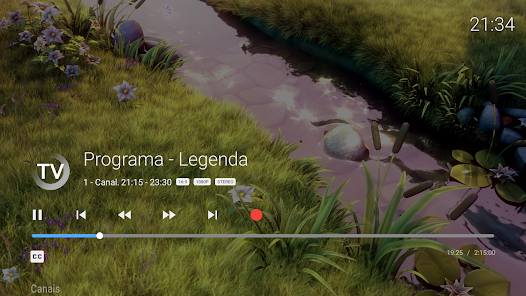
Sparkle TV app is a player interface. In everyday use, it helps you load your own IPTV provider details, playlists, or compatible TV sources into a layout built for large-screen television viewing. It is not normally the content itself. The app organizes playback, categories, guide behavior, and navigation while your own source determines what appears inside it.
This difference matters because many users compare apps without separating the player from the content. When you evaluate Sparkle TV app, you are mostly evaluating usability: device fit, interface comfort, guide quality, format support, and how easily the app matches the way you watch.
Quick Navigation
Use these sections to understand the app, review devices and formats, check setup basics, and compare Sparkle TV app with other popular IPTV players.
Why Sparkle TV App Is So Often Compared
Sparkle TV keeps appearing in modern IPTV player comparisons because it gives users a TV-style layout without making setup feel too technical. The official site and Google Play both emphasize support for Android TV, Google TV, and Fire TV devices, which makes it especially relevant for users who want a living-room player rather than a mobile-first app.
For many viewers, that combination is the main attraction. The app feels purpose-built for the screen in front of them while still supporting the formats and provider types they are most likely to use.
TV-First Experience
Sparkle TV is attractive because it feels built for television use on Android TV, Google TV, and Fire TV style devices.
Broad Source Support
Support for m3u, xtream codes, xmltv, and other compatible TV/media inputs gives the app practical flexibility.
Useful Balance
For many viewers, Sparkle TV sits in a comfortable position between simple setup and serious TV-focused use.
Which Devices Suit Sparkle TV App Best
Sparkle TV app is most relevant for Android TV, Google TV, and Fire TV stick style devices. The official sources emphasize those platforms directly. That makes the app especially attractive for viewers who want a television-first interface on a mainstream streaming setup.
If your main screen is a TV and you care more about guide comfort and remote navigation than about a phone-style dashboard, Sparkle TV app becomes a stronger comparison candidate.
Android TV and Google TV
This is one of the most natural environments for Sparkle TV because the app is built around TV-based use.
Fire TV and Firestick
Sparkle TV is also relevant for Fire TV stick users who want a television-style IPTV player.
TV-Based Streaming Setups
The more you care about a TV-first interface on a large screen, the more Sparkle TV deserves serious comparison.
Formats and Inputs Sparkle TV Supports
One of the most practical reasons people choose Sparkle TV is format flexibility. The official site and Play listing both mention support for m3u, xtream codes, and xmltv. The app also goes beyond standard IPTV provider formats by mentioning compatibility with HdHomeRun, Plex, and Jellyfin inputs.
That flexibility matters because users do not all start from the same point. Some only have playlist URLs, some use structured account details, and others want a player that can sit closer to a broader TV or media setup.
M3U and Xtream Codes
These are two of the most important formats users check first when choosing a practical IPTV player.
XMLTV Guide Support
Guide data matters because a television-oriented app becomes much more useful when the EPG is clear and complete.
Beyond Standard IPTV Inputs
Support for sources like HdHomeRun, Plex, and Jellyfin makes Sparkle TV more flexible than some viewers first expect.
How Sparkle TV App Setup Usually Works
The normal setup path is straightforward. Install the app on the device, choose the login or source type that fits your setup, load the provider details, then review channels, guide behavior, and categories. After that, the most important part is not the install itself but the way the experience feels once you begin using it every day.
A strong Sparkle TV setup should make it easy to switch groups, browse the guide, and manage the content sources you care about most.
Step 1: Install the App
Start from the official website or Google Play listing so you know you are evaluating the correct app.
Step 2: Choose the Source Type
Load the provider format or media source that matches your actual setup.
Step 3: Organize the Experience
Once content loads, review guide behavior, groups, and favorites so the app feels comfortable every day.
What People Usually Like About Sparkle TV App
Users typically care about a few important things when they compare Sparkle TV: whether it really feels built for television use, whether the guide is easy to read, whether source formats are supported cleanly, and whether the player remains comfortable during daily channel surfing and category browsing.
This is one reason Sparkle TV attracts users who want a serious TV-based player without jumping immediately to the most customization-heavy option.
Serious TV Feel
The app appeals to viewers who want a player that belongs on a big screen rather than a mobile-style dashboard.
Source Flexibility
Broad support for common provider formats and compatible TV/media inputs gives the app more practical value.
Guide and Navigation Comfort
The more a person watches live television, the more interface comfort and guide readability begin to matter.
Where to Start the Sparkle TV App Download Path
The cleanest starting point is the official Sparkle TV website or the Google Play listing. Starting there reduces confusion, helps you identify the correct app, and gives you the right reference point before you enter any provider details.
If you are using a Fire TV or Android TV device and want a player that begins from a clearly supported path, Sparkle TV is one of the easier apps to evaluate this way.
Official Sparkle TV Site
Use the official site as the cleanest first checkpoint before setup.
Google Play Listing
The Play listing is also a strong reference point when your device path supports it.
Visual Guide: What to Expect Inside Sparkle TV
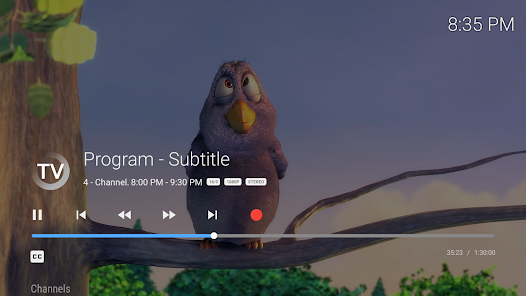
A strong Sparkle TV setup should feel television-first very quickly. The guide should be readable, categories should feel organized, and source switching should not become confusing.
This matters most for viewers who use the same player daily and want comfort, not just first impressions.
Sparkle TV App vs Other Popular IPTV Apps
Sparkle TV app is commonly compared with TiviMate, IPTV Smarters Pro, and XCIPTV. TiviMate is often favored when someone wants a more deeply TV-native guide-focused experience. IPTV Smarters Pro often appeals to users who prefer a more familiar dashboard structure. XCIPTV is usually compared as a practical modern middle-ground player.
Sparkle TV often wins attention from users who want a television-oriented interface and broad source support without feeling pushed into the heaviest setup path.
Sparkle TV vs TiviMate
Choose TiviMate when you want a more heavily guide-focused TV-native experience. Choose Sparkle TV when you want TV-first use with broader source flexibility.
Sparkle TV vs IPTV Smarters Pro
Choose Sparkle TV when the television-oriented layout matters more. Choose Smarters Pro when a familiar dashboard matters more.
Sparkle TV vs XCIPTV
Both can feel practical, but Sparkle TV may appeal more to users who prioritize TV-first design and source flexibility.
Mistakes to Avoid Before Installing Sparkle TV App
Common mistakes include assuming the app will provide channels on its own, skipping format checks before installation, and choosing only by screenshots instead of by device fit. Some users also ignore how important guide comfort is until after setup, even though that becomes one of the biggest daily differences between IPTV players.
You can avoid most of these problems by checking the device first, confirming your input format, and deciding whether you want a TV-first interface or a more general dashboard feel.
Expecting Built-In Channels
Like other IPTV players, Sparkle TV is normally the interface layer rather than the content source.
Skipping Source Checks
Confirm whether you are using m3u, xtream codes, xmltv, or another compatible input before setup.
Choosing Only by Popularity
The app should match your device and the way you watch, not just the fact that it appears in comparisons.
When Sparkle TV App Is the Right Choice
Sparkle TV is often the right choice when you want a television-first IPTV player that still remains flexible about the source types you add. It becomes especially attractive when Android TV, Google TV, or Fire TV is your main viewing environment and you care about a guide-friendly interface without immediately choosing the most customization-heavy option.
For many viewers, this makes Sparkle TV a smart middle-ground choice. It feels more TV-oriented than some dashboard-first players while still being approachable for users who do not want unnecessary complexity.
At the same time, the best choice depends on what you value most. If you want the strongest guide-first TV experience, TiviMate may still win. If you want a more familiar app dashboard, IPTV Smarters Pro may still fit better. Sparkle TV becomes strongest when you want balance plus broad source support.
Frequently Asked Questions About Sparkle TV App
These are the questions users ask most often before installing Sparkle TV app or comparing it with other IPTV players.
What is Sparkle TV app used for?
Sparkle TV app is used as a DVR/PVR style player for IPTV and compatible TV/media sources on Android TV, Google TV, and Fire TV style devices.
Does Sparkle TV provide channels by itself?
Usually no. The app is generally the interface layer, while your own provider details or source determine the content.
Which formats does Sparkle TV support?
Official sources mention support for m3u, xtream codes, xmltv, and additional compatible inputs such as HdHomeRun, Plex, and Jellyfin.
Which devices suit Sparkle TV best?
Android TV, Google TV, and Fire TV style devices are the most directly supported environments.
Is Sparkle TV better than TiviMate?
That depends on whether you want broader source flexibility with a TV-first interface or a more guide-centric television-native experience.
Where should I start the download process?
The official Sparkle TV website and the Google Play listing are the best first checkpoints before setup.
Ready to Try Sparkle TV App?
If Sparkle TV app still feels like the right fit, the next step is to use the official site or store path, prepare the source details you plan to add, and continue with the device guide that matches your screen. If you are still comparing, use the IPTV Apps page or open the direct comparisons with TiviMate, IPTV Smarters Pro, and XCIPTV.